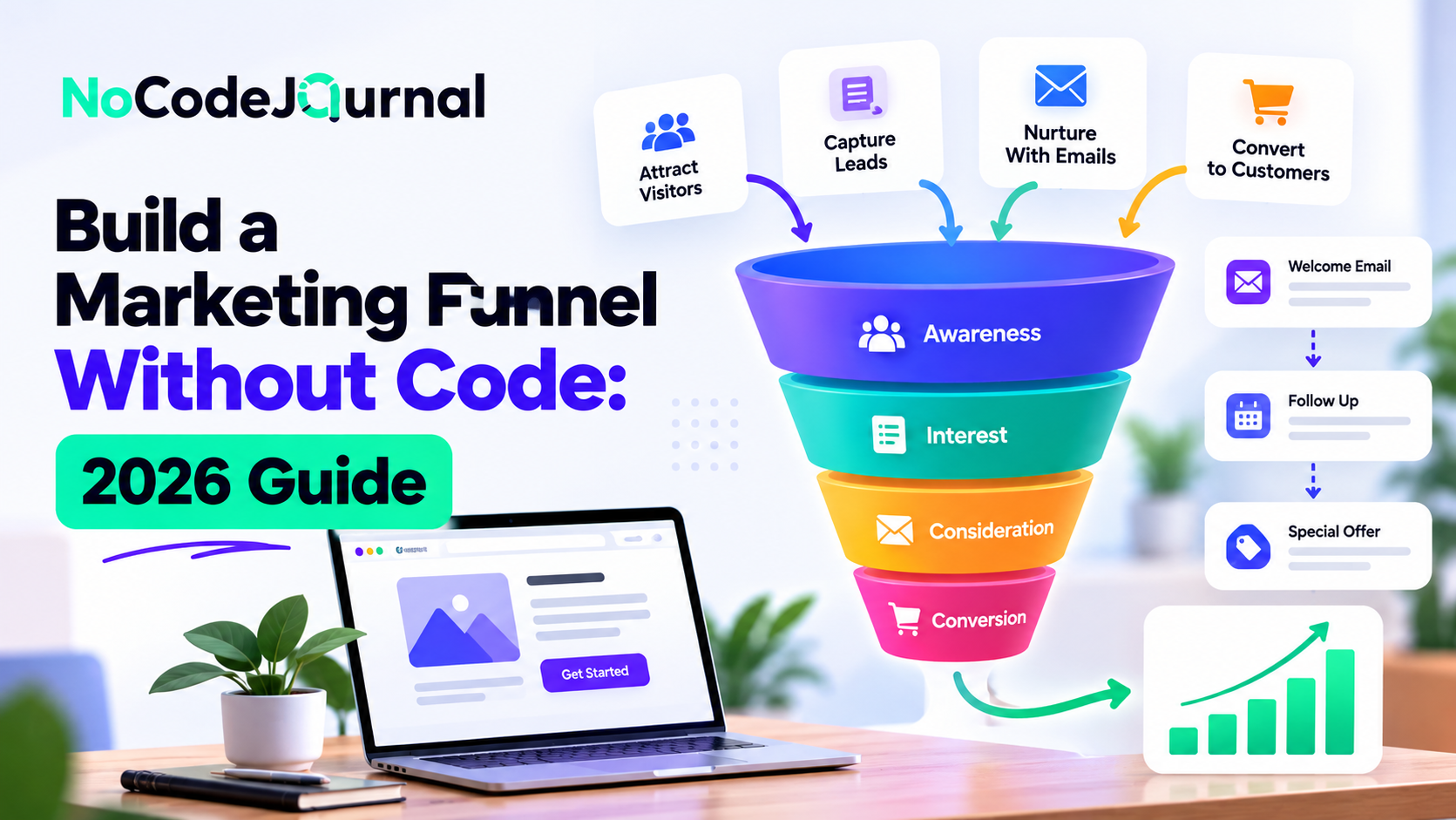
Imagine turning website visitors into potential customers, automatically sending follow-up emails, and generating sales without writing a single line of code.
For many entrepreneurs and small businesses, building an effective marketing funnel once required technical expertise, expensive software, and assistance from developers.
Today, NoCode tools have changed the process.
Whether you're launching a startup, selling digital products, offering consulting services, or growing an online business, you can create a complete marketing funnel using visual builders and automated workflows.
A NoCode marketing funnel helps you attract visitors, capture leads, nurture relationships, and guide potential customers toward a purchase without traditional programming.
But simply connecting a few marketing tools isn't enough.
A successful funnel requires a clear strategy, relevant content, reliable automation, and continuous improvement.
In this step-by-step guide, we'll explain how to build a marketing funnel without code, introduce beginner-friendly tools, and show you how to create an effective customer journey from the first interaction to the final conversion.
What Is a Marketing Funnel?
A marketing funnel represents the journey people take from discovering your business to becoming customers.
It's called a funnel because not everyone who discovers your business will eventually make a purchase.
Some visitors explore your content, others become interested in your offer, and a smaller group decides to buy.
Understanding these stages helps businesses provide the right information at the right moment.
The Three Main Stages of a Marketing Funnel
1. Top of the Funnel (TOFU): Awareness
At this stage, potential customers discover your business.
They might find your website through Google, see your content on social media, or click an advertisement.
Your objective is to attract attention and introduce the problem your business solves.
2. Middle of the Funnel (MOFU): Consideration
Interested visitors begin evaluating your products or services.
They may download a guide, subscribe to your newsletter, compare alternatives, or attend a webinar.
Your goal is to provide useful information and build trust.
3. Bottom of the Funnel (BOFU): Conversion
Potential customers decide whether to take action.
This might involve purchasing a product, booking a consultation, requesting a demonstration, or subscribing to a paid service.
A well-designed funnel makes this decision easier by removing unnecessary friction.
What Is a NoCode Marketing Funnel?
A NoCode marketing funnel uses visual software platforms to create and connect the different stages of the customer journey.
Instead of building custom websites, databases, and automation systems from scratch, you use existing tools.
For example, you could create a landing page with Carrd, collect email addresses using Tally, automate follow-up messages through MailerLite, and manage leads in Airtable.
These services can be connected through supported integrations.
The result is a functional marketing system without extensive programming.
Why Businesses Choose NoCode Funnel Builders
NoCode platforms offer several advantages:
-
Faster setup: Templates and visual editors reduce initial development effort.
-
Lower technical barriers: Business users can manage many activities independently.
-
Reduced manual work: Automated workflows handle repetitive tasks.
-
Flexible customization: Landing pages and emails can be updated easily.
-
Accessible experimentation: Businesses can test offers before investing heavily.
-
Scalable workflows: Additional features can be introduced as requirements grow.
To explore these advantages further, read our article on the benefits of NoCode development.
Step 1: Define Your Marketing Funnel Goal
Before selecting a platform, decide what your funnel should accomplish.
Without a clear goal, even a technically sophisticated funnel may produce disappointing results.
Your objective determines which tools, messages, and actions are necessary.
Choose Your Primary Objective
Common marketing funnel goals include:
-
Generating qualified sales leads.
-
Growing an email subscriber list.
-
Selling digital products.
-
Booking consultation calls.
-
Increasing online purchases.
-
Encouraging software trial registrations.
-
Promoting webinars or online events.
For example, a business consultant might want visitors to schedule discovery calls.
An online educator may want to sell a course.
A software startup might focus on attracting users to a free trial.
Each objective requires a different conversion strategy.
Define Your Target Audience
Identify the customers you want to reach.
Consider their needs, challenges, interests, and purchasing motivations.
Ask yourself what problem your product solves and why someone would choose it over competing alternatives.
The more clearly you understand your audience, the easier it becomes to develop relevant marketing messages.
Step 2: Map Your Customer Journey
Once your goal is clear, outline the steps customers will follow.
A simple funnel might look like this:
-
Visitors discover your business through social media or search engines.
-
They click through to a landing page.
-
They receive an offer to download a free resource.
-
They submit a form to receive that resource.
-
An automated email sequence introduces additional information.
-
Interested subscribers visit a sales page.
-
They make a purchase or book a consultation.
This structure creates a consistent experience.
Keep Your Initial Funnel Simple
Beginners sometimes create unnecessarily complicated funnels.
They add numerous landing pages, multiple email sequences, and several different offers before testing customer interest.
Start with one clear customer journey.
For example, a small consulting business may only need a landing page, contact form, automated acknowledgment email, and appointment-booking system.
Once the funnel is working, additional steps can be introduced.
Our guide on how to build a funnel fast with NoCode tools provides another practical approach to launching a simplified funnel.
Step 3: Create a Landing Page Without Coding
Your landing page is where visitors first encounter your offer.
Its primary purpose is to encourage one specific action.
Unlike a traditional business website, which may contain several navigation options, a funnel landing page should minimize distractions.
Best NoCode Landing Page Builders
Carrd
Carrd allows users to create responsive, single-page websites through a visual editor.
It's particularly useful for simple lead-generation pages and personal business offers.
Webflow
Webflow provides extensive visual design capabilities for businesses requiring more customized layouts.
Framer
Framer helps users create modern websites and interactive landing pages through visual tools.
Systeme.io
Systeme.io combines funnel-building functionality with email marketing and related business tools.
Elements of an Effective Landing Page
A strong landing page should include a clear headline, an explanation of the offer, relevant visuals, and a prominent call to action.
For example, a productivity consultant might use the headline:
"Organize Your Business in 7 Days With Our Free Productivity Checklist."
A supporting paragraph could explain what the visitor will learn.
The page might include an image of the checklist and a button labeled "Get My Free Checklist."
Optimize for Mobile Users
Check that your landing page works on smartphones and tablets.
Use readable text, simple forms, and buttons that are easy to select.
Avoid unnecessary visual elements that distract visitors or increase loading time.
If you're creating a website for the first time, our guide on how to build your dream website without coding explains the basics of visual website development.
Step 4: Create a Valuable Lead Magnet
A lead magnet is a resource offered to potential customers in exchange for information such as their email address.
It's especially useful when customers need time to evaluate an offer before purchasing.
Popular Lead Magnet Examples
Free eBooks: Provide useful information about a specific subject.
Checklists: Help readers complete tasks or solve practical problems.
Templates: Offer ready-made resources that save time.
Free Webinars: Teach a valuable skill or introduce a particular solution.
Discount Codes: Encourage interested shoppers to make their first purchase.
Quizzes: Help visitors understand their needs through personalized results.
Choose a Relevant Offer
A lead magnet should address a problem closely related to your paid product or service.
For example, a graphic designer offering branding services could provide a free brand identity checklist.
A fitness instructor might offer a seven-day beginner workout plan.
The lead magnet creates an opportunity to demonstrate expertise and build trust.
NoCode Tools for Creating Lead Magnets
Canva can help create visually appealing PDFs, checklists, and presentations.
Notion can support shareable templates and educational resources.
Google Docs can be used to prepare downloadable guides.
Choose a format that's useful to your audience and easy to maintain.
Step 5: Capture Leads With NoCode Forms
Once your landing page and lead magnet are ready, you need a way to collect visitor information.
NoCode form builders make this process straightforward.
Recommended Form Tools
Tally: Offers a document-style form builder, conditional logic, and integrations.
Typeform: Provides interactive forms and conversational questionnaires.
Jotform: Includes templates, form customization, and business-oriented features.
Google Forms: Works well for basic surveys and simple information collection.
Keep Forms Short
Long forms can create unnecessary friction.
Ask only for information needed to fulfill the visitor's request or qualify the lead.
For a downloadable checklist, an email address may be sufficient.
For a consultation inquiry, you might also request a name and a brief description of the customer's requirements.
Clearly explain how the information will be used.
If you intend to send promotional emails, obtain appropriate consent and follow applicable privacy requirements.
Step 6: Build an Automated Email Sequence
Collecting leads is only the beginning.
Email marketing allows you to maintain communication with interested subscribers and help them understand your offer.
Rather than manually sending every message, you can create an automated sequence.
Best NoCode Email Automation Tools
MailerLite: Supports automated email workflows, subscriber groups, and campaign management.
Kit: Offers email marketing and automation tools for creators and online businesses.
Brevo: Provides email marketing, contact management, and automated communications.
ActiveCampaign: Supports advanced automation, audience segmentation, and customer relationship management.
Example: A Four-Email Welcome Sequence
Email 1: Deliver the Resource
Immediately provide the promised lead magnet.
Include a brief welcome message and instructions for using it.
Email 2: Share Helpful Information
Introduce practical advice related to the subscriber's problem.
Avoid immediately overwhelming them with sales messages.
Email 3: Demonstrate Your Expertise
Share an authentic customer example, useful tutorial, or relevant case study.
Explain how your approach solves the problem.
Email 4: Present Your Offer
Introduce your product or service and explain its value.
Provide a clear next step, such as scheduling a consultation or visiting a sales page.
How to Configure Email Automation
Most visual email platforms let you create a workflow using triggers and actions.
For example, someone joining a subscriber group could trigger a welcome email.
A delay could then control when the next message is delivered.
MailerLite's official guide to creating an automation workflow explains how to configure triggers, email actions, delays, and conditional paths.
Remember to monitor unsubscribe requests and ensure your emails comply with applicable marketing regulations.
Step 7: Connect Your Tools With NoCode Automation
Your funnel may use several separate applications.
For example, your landing page could use Carrd, your form could use Tally, and your email marketing system could use MailerLite.
Automation platforms can help exchange information between these tools.
Zapier
Zapier allows users to create workflows connecting supported applications.
A workflow begins with a trigger and performs one or more actions.
For example, a new form submission could trigger the creation of a customer record.
Make
Make offers a visual workflow builder for connecting applications and configuring multi-step automation scenarios.
n8n
n8n offers automation capabilities with additional technical flexibility, including self-hosting options.
Example: Connecting a Complete Funnel
Imagine a visitor submitting a consultation form.
The following workflow could be configured:
-
The visitor submits the form.
-
The lead is added to a database.
-
An automated confirmation email is sent.
-
A notification is delivered to the business owner.
-
The lead is assigned an appropriate follow-up status.
This reduces repetitive administrative work and helps maintain consistent communication.
Zapier's official Zap workflows quick start guide provides instructions for configuring triggers and actions.
Test Your Automation
Always verify your workflow before sending real customers through it.
Check that data reaches the correct destination, notifications are delivered, and users don't receive duplicate messages.
Review error logs and failed executions regularly.
Step 8: Organize Leads Using a NoCode CRM
As your funnel grows, managing customer information becomes increasingly important.
A customer relationship management system, or CRM, helps businesses track leads, conversations, and sales opportunities.
You don't necessarily need expensive enterprise CRM software.
Beginner-Friendly CRM Options
HubSpot CRM: Supports contact management, deal tracking, and sales-related activities.
Airtable: Allows users to organize customer information through customizable databases.
Stackby: Combines spreadsheet-style databases with linked records and workflow functionality.
Notion: Can support simple customer and project tracking systems.
Example: A Basic Sales Pipeline
Create stages such as:
-
New Lead.
-
Contacted.
-
Qualified.
-
Proposal Sent.
-
Negotiation.
-
Closed Won.
-
Closed Lost.
Each prospect can move through these stages as the relationship develops.
This helps you understand which opportunities require attention.
For businesses interested in customizable databases, our article on Stackby as a NoCode tool explores another way to organize business information.
Step 9: Create a High-Converting Sales Page
After nurturing leads, you need to present your product or service clearly.
A sales page explains the offer, addresses customer concerns, and encourages a specific action.
Essential Elements of a Sales Page
Compelling Headline: Explain the primary outcome your product helps customers achieve.
Problem Description: Show that you understand your audience's challenges.
Solution Overview: Explain how your product or service addresses those challenges.
Benefits: Focus on customer outcomes rather than simply listing features.
Social Proof: Include authentic testimonials, reviews, or case studies when available.
Pricing Information: Make important costs and conditions clear.
Call to Action: Tell visitors exactly what to do next.
Avoid Overcomplicating the Message
Visitors should understand the offer without reading unnecessary technical explanations.
Use concise paragraphs, descriptive headings, and relevant visuals.
A transparent offer is generally more trustworthy than exaggerated marketing claims.
Never invent testimonials or make unsupported promises about results.
Step 10: Add Payments or Appointment Scheduling
The final conversion step depends on your business model.
An e-commerce business needs a checkout system.
A consultant may need an appointment scheduler.
A SaaS startup might want free-trial registrations.
NoCode Payment Tools
Stripe Payment Links: Supports hosted payment links for eligible businesses.
Gumroad: Helps creators sell digital products.
Payhip: Offers online selling functionality for digital products and selected other offerings.
Lemon Squeezy: Provides checkout and commerce features for supported digital businesses.
Appointment Scheduling Tools
Calendly: Allows prospects to book available appointment slots.
TidyCal: Offers scheduling features suitable for many small businesses.
Before selecting a payment platform, review supported countries, currencies, transaction fees, and integration requirements.
Step 11: Track Your Marketing Funnel Performance
A funnel should be measured after launch.
Without reliable data, you won't know which parts of the customer journey need improvement.
Important Marketing Funnel Metrics
Landing Page Conversion Rate
The percentage of visitors who complete the landing page's desired action.
Lead-to-Customer Conversion Rate
The percentage of leads who eventually become paying customers.
Cost per Lead
The amount spent acquiring each lead through paid marketing.
Customer Acquisition Cost
The total relevant acquisition cost divided by the number of new customers acquired.
Email Click Rate
The percentage of delivered email messages that generate at least one click, according to the reporting platform's definition.
Using Google Analytics
Google Analytics can help track website interactions and important customer actions.
For example, businesses may want to measure successful lead submissions, checkout completions, and appointment confirmations.
Google's official guide to marking events as key events explains how to identify meaningful user interactions and measure them in Analytics.
Ensure each important action is tracked correctly before relying on reports for decisions.
Step 12: Optimize Your Funnel for Better Results
Once your funnel is live, use actual performance data to identify improvements.
Test Your Headlines
Experiment with different messages explaining the value of your offer.
Improve Calls to Action
Replace vague button labels with descriptions that clearly communicate the next step.
Simplify Lead Forms
Remove unnecessary questions to make registration easier.
Refine Email Content
Review engagement, unsubscribe activity, and customer responses.
Improve the Offer
Sometimes poor conversion results reflect an offer that doesn't address a sufficiently important customer need.
No amount of design optimization can fully compensate for weak product-market alignment.
Run Controlled Experiments
When possible, change one major variable at a time and allow sufficient data to accumulate before drawing conclusions.
For additional experimentation strategies, explore our article on growth hacking strategies for global startups.
Best NoCode Tools for Marketing Funnel Building
| Funnel Stage | Recommended Tools | Purpose |
|---|---|---|
| Landing pages | Carrd, Webflow, Framer | Create campaign pages |
| Lead magnets | Canva, Notion | Develop free resources |
| Forms | Tally, Typeform | Capture information |
| Email automation | MailerLite, Kit | Nurture subscribers |
| Integrations | Zapier, Make | Connect tools |
| CRM | Airtable, HubSpot | Manage leads |
| Payments | Stripe, Gumroad | Accept purchases |
| Scheduling | Calendly, TidyCal | Book consultations |
| Analytics | Google Analytics | Track key actions |
Start with the smallest technology stack that supports your funnel.
Using fewer tools can make setup, maintenance, and troubleshooting easier.
Example: Building a NoCode Funnel for a Coaching Business
Imagine a business coach launching a new online coaching program.
The goal is to attract interested professionals and convert qualified prospects into consultation bookings.
Stage 1: Generate Traffic
The coach publishes educational content on LinkedIn and shares useful articles through social media.
Stage 2: Capture Attention
Visitors click through to a Carrd landing page offering a free business planning checklist.
Stage 3: Collect Leads
A Tally form collects email addresses from visitors who want the resource.
Stage 4: Automate Follow-Up
MailerLite sends the checklist and begins a short educational email sequence.
Stage 5: Qualify Prospects
Interested subscribers are invited to complete a consultation questionnaire.
Stage 6: Book Consultations
Qualified prospects receive a Calendly link to book available appointment times.
Stage 7: Monitor Performance
The coach tracks landing page submissions, email engagement, and completed bookings.
This approach creates a structured process for attracting potential customers without building custom software.
Common Mistakes to Avoid When Building a NoCode Marketing Funnel
Choosing Tools Before Understanding Your Audience
Start with customer needs and business objectives, not software features.
Creating Too Many Funnel Steps
Every additional step creates another opportunity for visitors to leave.
Keep the experience focused.
Ignoring Mobile Optimization
Make sure landing pages, forms, and checkout processes work properly on smaller screens.
Sending Too Many Emails
Excessive communication can damage trust and increase unsubscribe rates.
Match frequency to subscriber expectations.
Neglecting Privacy
Collect only necessary information and handle personal data responsibly.
Failing to Test Integrations
An automation failure can prevent leads from receiving resources or reaching your CRM.
Measuring the Wrong Results
Email opens and page views may be useful, but actual inquiries, bookings, and purchases often provide a clearer understanding of business outcomes.
How Much Does It Cost to Build a NoCode Marketing Funnel?
The cost depends on the tools, features, and traffic requirements.
Some platforms offer free plans suitable for learning and small experiments.
However, businesses may need paid subscriptions for custom domains, advanced automations, larger subscriber lists, premium integrations, and increased usage.
Payment processing can introduce additional transaction fees.
A basic funnel may only require a landing page builder, email platform, and form tool.
As the business grows, it may benefit from CRM integration, advanced reporting, and more sophisticated automation.
Compare the total monthly cost before subscribing.
Avoid purchasing advanced software simply because it offers more features.
The Future of NoCode Marketing Funnels
NoCode marketing tools are becoming more sophisticated through AI-assisted content creation, workflow automation, and improved integrations.
AI tools can help marketers draft landing page copy, generate email ideas, and organize campaign strategies.
Advanced platforms can also support audience segmentation and behavior-based communication.
However, these capabilities don't automatically produce a successful marketing strategy.
Businesses still need strong offers, accurate customer research, ethical communication, and reliable measurement.
The future of funnel building will likely involve more automation, but human judgment remains essential.
Conclusion: Build Your Marketing Funnel Without Coding
Building a marketing funnel without code is an accessible option for entrepreneurs, freelancers, startups, and established businesses.
Visual landing page builders simplify website creation.
Form tools help collect customer information.
Email marketing platforms automate communication.
Integration tools connect different systems, while analytics services help measure performance.
Together, these technologies make it possible to create an effective customer journey without extensive programming knowledge.
However, the most important element of a successful funnel isn't the software.
It's understanding your audience and offering something valuable.
Start with one goal, one landing page, one useful offer, and one clear next step.
Test the complete experience before launching.
Then use customer feedback and performance data to improve your funnel over time.
With a focused strategy and the right NoCode tools, you can build a practical marketing system that supports sustainable business growth.
Frequently Asked Questions
What is a NoCode marketing funnel?
A NoCode marketing funnel is a customer acquisition and conversion process created using visual software tools rather than custom programming.
Can I build a complete marketing funnel without coding?
Yes. NoCode platforms can support landing pages, forms, email automation, lead management, scheduling, and payment processing.
Which NoCode tools are best for beginners?
Carrd, Tally, MailerLite, Zapier, and Airtable are useful starting options for different funnel activities.
How long does it take to create a NoCode marketing funnel?
A simple funnel can sometimes be assembled within a day when content and integrations are ready. More complex funnels require additional planning and testing.
Can I build a marketing funnel for free?
Some platforms offer free plans, but advanced features, increased usage, and custom domains may require paid subscriptions.
How do I automate my marketing funnel?
Use tools such as Zapier, Make, or built-in platform integrations to connect form submissions, contact records, email sequences, and notifications.
What is the difference between a marketing funnel and a sales funnel?
A marketing funnel generally focuses on attracting and nurturing potential customers, while a sales funnel emphasizes progressing qualified opportunities toward purchase. In practice, the two processes often overlap.
How do I know whether my funnel is working?
Track important actions such as lead submissions, consultation bookings, purchases, acquisition costs, and customer conversion rates.
Do I need a CRM to build a marketing funnel?
Not necessarily. A small funnel can begin with an email marketing platform. A CRM becomes more useful as lead volume and sales complexity increase.