What Is AppInvento.io, and Is It Worth Using in 2026?
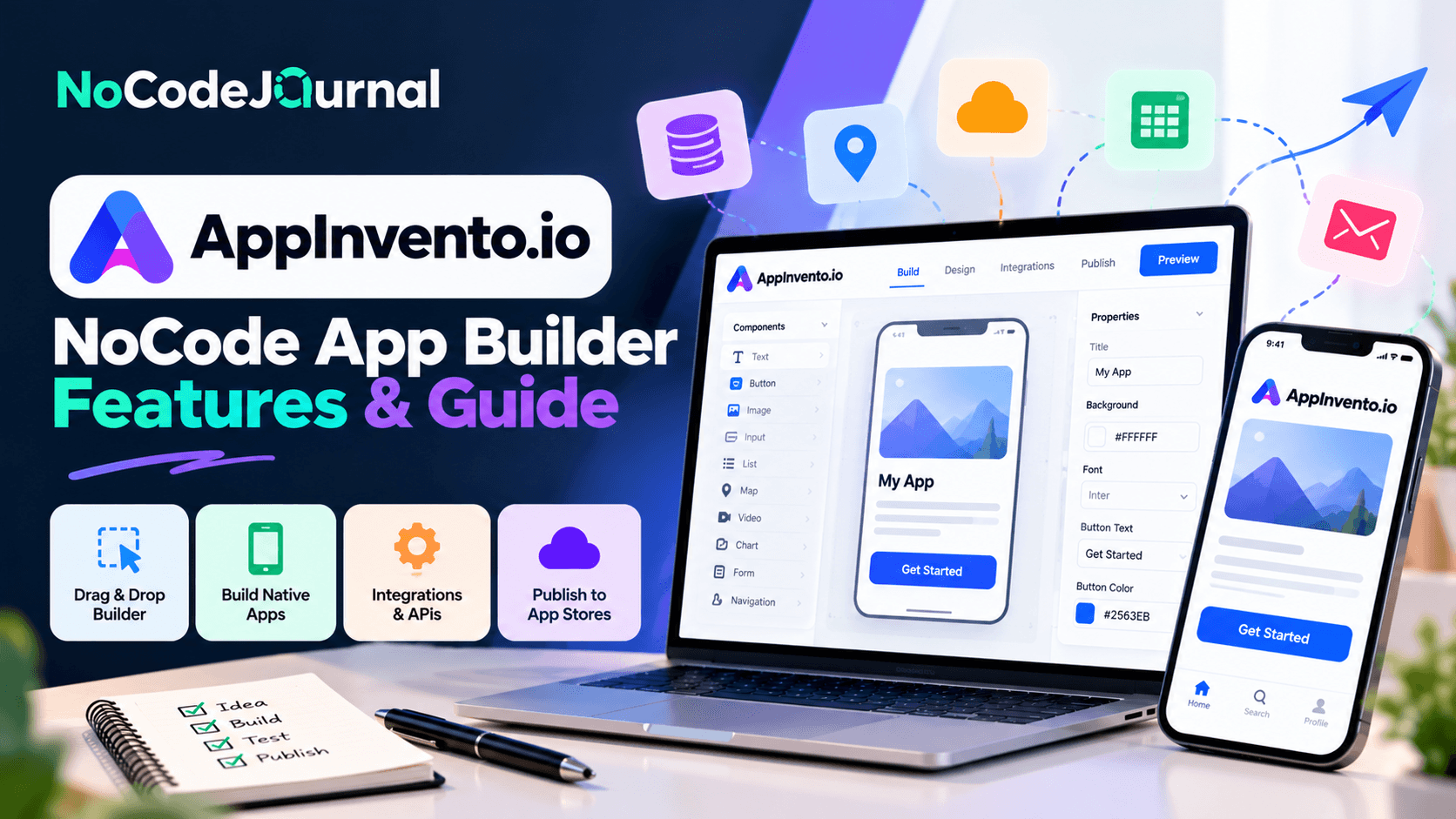
AppInvento.io is a no-code and low-code application development platform that helps users create web applications, generate backend code, configure databases, and build APIs without writing every component manually. It offers visual development tools, authentication integrations, and AI-assisted capabilities designed to simplify application development for startups, freelancers, and businesses. In 2026, AppInvento.io is worth exploring for rapid prototyping and backend development, although complex applications may still require technical expertise, testing, and customization.
AppInvento.io Plans, Pricing and Features (October 2026)
|
Plan |
Price |
Best for |
Key limitations |
|---|---|---|---|
|
Free |
$0 |
Beginners testing the platform |
3 projects, 5 tables, 0 commits |
|
Pro |
$99/month |
Startups and developers building multiple applications |
10 projects |
|
Enterprise |
Custom pricing |
Agencies and businesses with larger development requirements |
Requires a custom quotation |
Pricing checked October 16, 2026, in USD. AppInvento's public pricing page also advertises a 14-day trial and a 20% yearly-billing discount. For the latest pricing, trial offers, and subscription terms, check AppInvento.io's official pricing page.
Official source: AppInvento.io Pricing.
Which AppInvento.io Plan Should You Choose?
The Free plan is a useful starting point for individuals who want to explore AppInvento.io's database configuration, API generation, and application development features without an upfront subscription.
The Pro plan is better suited to startups, developers, and small teams that need more projects, unlimited tables, and broader access to available integrations. Organizations planning larger development initiatives can explore Enterprise pricing for expanded project capacity and customized requirements.
Before choosing a plan, evaluate project limits, available integrations, generated-code ownership, deployment options, security requirements, and the technical skills needed to maintain the finished application.
For the latest subscription details, visit the official AppInvento.io pricing page.
What Is AppInvento.io?
AppInvento.io is a NoCode and code-generation platform that helps users build web applications by simplifying common software development tasks.
Its tools are designed to reduce the amount of manual programming needed for application creation.
Rather than writing every backend component individually, users can configure project requirements and generate supporting code.
The platform includes capabilities for creating database structures, defining API routes, managing authentication, and generating application components.
AppInvento also provides React-based interface-building capabilities for creating visual layouts.
Its evolving application platform introduces AI-powered development features aimed at generating full-stack applications from natural-language instructions.
How Is AppInvento Different From Traditional Development?
Traditional application development involves several interconnected activities.
Developers must create user interfaces, configure databases, establish server-side functionality, implement authentication, and connect different services.
Each stage requires planning, testing, and implementation.
AppInvento simplifies selected parts of this process through automated code generation and visual configuration.
For example, instead of manually writing common API endpoints, users can define their database structure and configure the desired routes.
The platform can then generate relevant backend code.
This approach is particularly useful for reducing repetitive development work.
To understand why visual development is gaining attention, read our article on the benefits of NoCode development.
Why Are NoCode App Builders Becoming Popular?
Businesses increasingly need software to manage operations, connect with customers, and introduce digital services.
However, building applications through traditional methods can involve substantial development effort.
NoCode platforms aim to make software creation more accessible and efficient.
Faster Development
Visual builders and code generators can reduce time spent creating common application components.
Reduced Technical Complexity
Users can configure functionality through interfaces rather than manually implementing every detail.
More Accessible Prototyping
Entrepreneurs can experiment with application concepts before investing in extensive custom development.
Greater Development Flexibility
Some platforms generate code that developers can review, customize, and extend.
More Time for Innovation
By simplifying repetitive technical tasks, teams can focus on features that distinguish their applications.
AppInvento combines several of these advantages through backend code generation, visual development, and AI-assisted functionality.
Key Features of AppInvento.io
Understanding a platform's features helps determine whether it matches your project requirements.
Here are the important capabilities AppInvento offers.
1. NoCode Backend Development
Backend development is one of the most technically demanding parts of creating an application.
The backend manages data, authentication, business logic, and communication between different components.
Traditionally, developers create these systems using programming languages and frameworks such as Node.js and Express.js.
AppInvento offers a backend builder designed to automate common development activities.
Users can define database structures, configure routes, and generate supporting code.
Why Backend Automation Matters
Imagine you're creating a customer-management application.
You need a system to store customer records, retrieve information, update details, and manage user permissions.
Without automation, developers would need to implement and test these components manually.
AppInvento can help generate the underlying structure based on project configurations.
This can reduce repetitive coding and provide a starting point for further development.
However, developers should still review the generated code and test business-specific requirements before deployment.
2. Automatic API Generation
Application programming interfaces, commonly known as APIs, allow software systems to communicate.
For example, when a mobile application displays account information, it may retrieve that data from a backend service through an API.
Creating APIs manually requires defining routes, implementing request handling, validating inputs, and managing errors.
AppInvento provides API generation capabilities that simplify part of this process.
How API Generation Helps
Consider an online inventory management application.
The application needs functionality for adding products, retrieving stock information, updating quantities, and removing obsolete records.
AppInvento's backend tools can help generate APIs around configured data structures and routes.
This reduces the need to create every standard operation individually.
The platform also supports custom routes for applications requiring more specialized functionality.
Automatic API generation can be especially valuable for developers building multiple applications with similar backend requirements.
3. Database Schema Configuration
Almost every dynamic application depends on a database.
Databases store information such as customer accounts, product details, order histories, and transaction records.
Designing these structures usually requires understanding data models and relationships.
AppInvento allows users to configure database schemas as part of the backend development process.
Example: Building a Customer Database
Suppose you're developing a service-booking application.
You might need collections or data structures for customers, services, appointments, and employees.
Through the platform's configuration tools, you can define the information each structure needs.
The generated backend can then use those definitions to support application functionality.
This approach provides a more guided starting point for database-driven development.
However, careful data modeling remains essential.
Poorly organized data structures can still create performance and maintenance problems regardless of the development platform.
4. Authentication and Authorization
Many applications require users to create accounts and sign in.
Authentication verifies a user's identity, while authorization determines which information and actions that user can access.
AppInvento provides functionality for configuring authentication and user roles.
Its documentation also describes add-ons for selected login methods.
A Practical Example
Imagine an application with three types of users:
-
Administrators who manage the system.
-
Employees who update operational records.
-
Customers who view their personal information.
Each user category requires different permissions.
AppInvento's role and authorization features can help establish this access structure.
Security configurations must still be carefully reviewed and tested.
In particular, production applications should validate permissions on the backend rather than relying only on interface restrictions.
5. Visual React.js Builder
An application's frontend is the part users interact with.
It includes pages, buttons, forms, menus, and other visual elements.
AppInvento provides a React.js Builder designed to help create interfaces through visual tools.
Users can arrange elements using drag-and-drop functionality and generate supporting React components.
Why Visual Interface Development Is Useful
Consider a startup building an internal reporting dashboard.
The team might need navigation menus, data tables, interactive buttons, and reporting sections.
A visual builder can help create the initial interface more efficiently.
Developers can then connect the interface to backend services and implement additional functionality.
This combination of visual design and generated code helps bridge the gap between NoCode development and traditional programming.
If you're exploring simpler website-building options, our guide on how to build your dream website without coding explains another approach to creating digital experiences.
6. Source Code Generation
One of AppInvento's distinguishing features is its emphasis on generating application source code.
Some NoCode platforms primarily provide applications that operate within their own managed environments.
AppInvento's backend builder instead focuses on generating code that can be inspected and developed further.
This can be useful for teams that want to combine automated development with traditional engineering practices.
Benefits of Generated Source Code
Developers can potentially review application structure, understand generated functionality, and make custom modifications.
Code generation can also reduce repetitive work associated with common backend patterns.
However, generated code should not automatically be assumed to be secure, optimized, or production-ready for every use case.
Code quality reviews, performance testing, and dependency management remain important.
7. API Documentation and Testing Support
API documentation helps developers understand how to interact with backend services.
Without clear documentation, connecting frontend applications or external systems can become difficult.
AppInvento's product information describes support for generating Postman and Swagger documentation.
These tools are commonly used in API development workflows.
Why Documentation Matters
Imagine a backend developer creating APIs for a mobile application.
The mobile developer needs to understand available routes, required parameters, and expected responses.
Documentation provides a shared reference that simplifies integration.
It can also help teams test application behavior and troubleshoot problems.
For developers unfamiliar with API documentation tools, the official Swagger API documentation explains how API descriptions and related tooling support API development.
8. Integrations and Add-Ons
Modern applications frequently require functionality beyond basic data storage.
Users may need social login, file uploads, verification systems, or connections with external services.
AppInvento's documentation describes add-ons that provide additional capabilities.
Examples include authentication integrations, CAPTCHA functionality, and file-upload options.
How Add-Ons Simplify Development
Suppose you're developing a membership application.
You may want users to register through an existing social account instead of creating a new password.
A supported authentication add-on can simplify the initial implementation.
Similarly, a file-upload add-on can help applications accept documents or images.
These components reduce the need to develop every integration from scratch.
Before implementing an add-on, verify its current availability, configuration requirements, and any associated costs.